CHAMET HOSTS & AGENTS

Chamet Agents: agency & host registration

Start a Chamet agency or join as a host. Follow registration steps, learn the agent dashboard and get practical onboarding help from Chamet Agents.

Already an agent? Log in →
✧ Chamet host registration
✧ Agency recruitment guidance
✧ Account & team support

THE CHAMET ECOSYSTEM

What is a Chamet agency?

A Chamet agency recruits and supports hosts who use the app for live streaming and video calls. Agents guide onboarding, share invitation links and review team activity in the agency dashboard. Hosts create content and interact with viewers; agents manage and support the team.

◇

VIEWERS

Watch & connect

Enjoy live streams, chat with hosts and send virtual gifts.

WATCH · CHAT · GIFTS

◎

HOSTS

Go live & engage

Create live moments and connect with your audience.

STREAM · INTERACT · CREATE

Register as a host ↗ See host guide →

↗

AGENTS

Build & support

Recruit eligible hosts, guide onboarding and manage your team.

RECRUIT · GUIDE · MANAGE

Start an agency ↗ See agency guide →

Chamet roles: viewers watch, chat and send gifts; hosts go live and create; agents recruit, guide and support hosts.
YOUR REGISTRATION CHECKLIST

How to register with Chamet

Choose your role. Complete verification. Prepare to stream or build your team.

FOR AGENTS

Register your agency

  1. Open the agency registration link and select your country code.
  2. Enter your phone number and tap Send.
  3. Enter the verification code, create a password and enter it again.
  4. Tap Register, then sign in to the agent portal.

Keep your password and verification code private. Use the separate host link if you want to stream rather than manage a team. Agency registration steps →
Illustration of agency registration with phone number, verification code, password, Register and Login.

▤  │  Registration illustration · Tap to enlarge

FOR HOSTS

Prepare your host account

  1. Open the host invitation link and complete the available phone or email verification.
  2. Follow the download instructions and sign in with the account you registered.
  3. Complete your profile and any required face verification.
  4. Check the current host rules before your first live session.
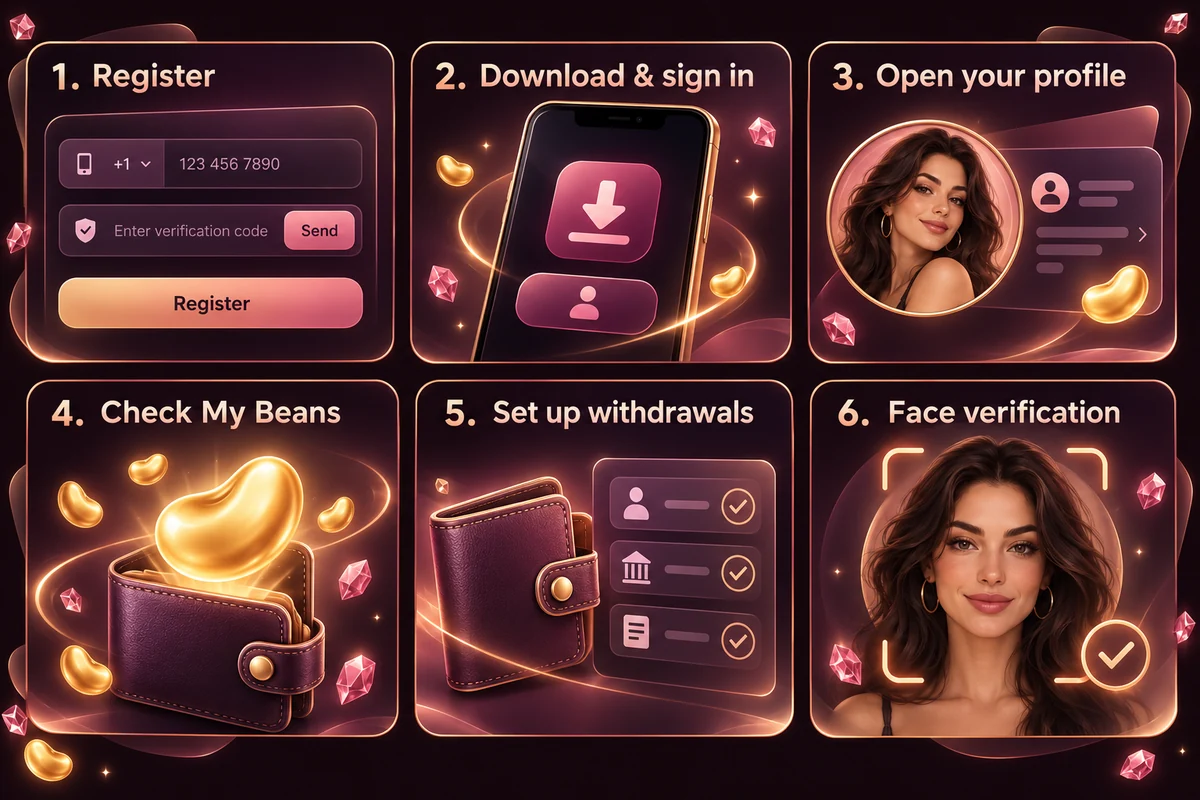
Already using Chamet? Check account-binding rules before accepting another agency invitation. Host registration steps →
Six illustrated host onboarding stages: registration, download and sign-in, profile, My Beans, withdrawals and face verification.

▤  │  Host onboarding illustration · Tap to enlarge

AFTER REGISTRATION

Check your payout setup

  1. Open your profile and find the earnings or My Beans area.
  2. Open Withdraw to review the checks required for your account.
  3. Complete the available identity and wallet-linking steps using your own accurate details.

Check supported payment methods, minimums, fees and processing times in your account. Host earnings and agency commission may use different instructions. Wallet & withdrawal guide →
Payout setup illustration: open your profile, check My Beans, and set up withdrawal verification.

▤  │  Payout setup illustration · Tap to enlarge

▤  │  Illustrations explain the process; the live app and agent portal may show different screens. Follow the current instructions for your account.

ABOUT CHAMET AGENTS

Practical support for hosts and agencies

Chamet Agents helps hosts and agencies understand registration, onboarding and team growth.

Independent guidance. Approval, commission and payouts follow Chamet’s current policies.

01 Registration guidance

Choose the correct link and prepare your account details.

02 Host onboarding

Set up your profile, connection and streaming space.

03 Recruitment & team support

Invite eligible hosts and support your team.

Understand your Chamet agency

Quick guides for every stage of your agency journey.

What is the Chamet app?

Live streaming and video chat connect hosts with viewers. Agents recruit and support host teams.

Chamet host recruitment

Invite eligible creators, explain the rules and help hosts get started.

Chamet agency dashboard

Find invitation links, review host activity and follow your team’s reports.

Chamet agency commission

Understand eligible earnings, your commission rate and reporting periods. Income varies.

Chamet payments & withdrawals

Check payment methods, verification, payout thresholds and processing times in your account.

Eligibility and account safety

Check eligibility. Protect your passwords and codes. Follow account-binding rules.

What to check in your agency dashboard

How do I start a Chamet agency?
Follow the agency registration steps, then sign in to the agent portal. Locate the separate host and sub-agent invitation links, check who has joined and review the reporting period before comparing activity or earnings.

Want to stream instead? Follow the Chamet host registration guide.

Explore the agent dashboard and reports →

Understand the commission calculation

How does Chamet agency earning work?
An agent’s commission depends on eligible team activity and the rate shown in the agency account. For example, $500 in eligible direct-host earnings × a sample 10% rate = $50. Sub-agent calculations may use the difference between the agency and sub-agent rates. These are calculation examples, not an income forecast.

Understand Chamet commission and worked examples →
Check payment and withdrawal preparation →

ANSWERS BEFORE YOU APPLY

Chamet registration FAQs

Quick answers before you apply. Confirm current requirements in your account.

A host creates live-streaming and video-chat content and interacts with viewers. An agent builds and supports a host team, with responsibilities such as recruitment, onboarding and ongoing communication. Choose the role that matches the work you want to do.

Use the host registration or agency registration button on this page. Check that the invitation matches your role, review eligibility and complete the platform’s verification process. Approval and account access are determined by the platform.

You can ask for guidance before applying. Prepare your questions about availability, profile setup, streaming equipment and community rules. Previous experience does not replace the platform’s eligibility or verification requirements.

There is no guaranteed income. Host earnings and agency commission depend on eligible activity, performance and the platform’s current policies. Confirm the rate, qualifying activity, reporting period and payout conditions shown in your own account.

Use the WhatsApp button on this page and send a text message. Tell us your country, whether you are interested in hosting or agency registration, and what you need help with. Never send passwords or one-time verification codes.

Confirm the payment method supported by your account, verification requirements, payout threshold, processing schedule and any fees. Use the current instructions shown by the platform; conditions may differ by account or region and can change.

Do not assume that an existing account can be added to a new agency or moved between agencies. Ask the platform or your current agency about account-binding rules before registering again or accepting another invitation.

Check your phone number and country code, mobile reception and the resend instructions shown on the registration page. If the problem continues, use the platform’s support channel. Never share a verification code with someone offering to register for you.

No. Chamet Agents is an independent registration and onboarding support website. The Chamet platform controls account approval, community rules, earning conditions and payments. Registration links on this page open the host or agency invitation flow.

READY TO TAKE THE NEXT STEP?

Discuss your Chamet registration

Host or agent? Message us on WhatsApp for registration help. Text messages only.

Scroll to Top